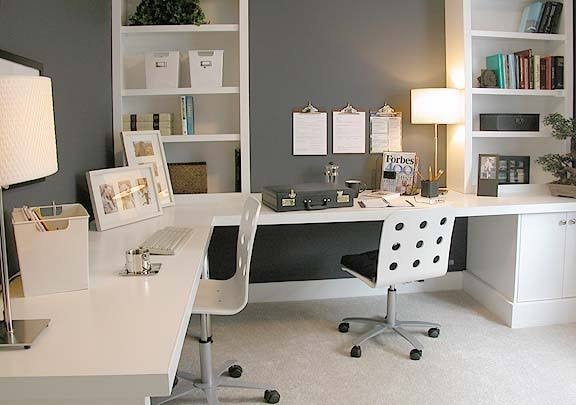
Home Office Improvements for Better Productivity
Working from home has become a normal part of life for millions of people. Whether you work remotely full-time, run a business from home, or simply need a dedicated place to manage personal projects, your home office plays a huge role in how productive and motivated you feel. A well-designed workspace can help you stay focused, reduce stress, and even improve your overall well-being.
Many people assume they need an expensive renovation to create an effective home office, but that’s not true. Small improvements like better lighting, smarter organization, comfortable furniture, and thoughtful décor can dramatically transform your workspace without breaking the bank.
If you’re looking to increase your productivity while making your office a place you genuinely enjoy spending time in, these home office improvement ideas will help you create the perfect environment.
Choose the Right Location
One of the biggest productivity boosters starts with selecting the right location for your workspace. Ideally, your office should be in a quiet part of your home where distractions are minimal.
If you have an extra room, converting it into a dedicated office provides privacy and helps separate work from personal life. However, even if space is limited, you can create an efficient workstation in a bedroom corner, under the stairs, or in an unused nook.
The key is consistency. Having a dedicated workspace trains your brain to associate that area with focus and productivity.
Invest in an Ergonomic Chair
You’ll likely spend several hours sitting each day, making your office chair one of the most important investments.
A quality ergonomic chair supports your lower back, encourages good posture, and reduces neck and shoulder strain. Features like adjustable armrests, lumbar support, seat height adjustment, and breathable materials can make a significant difference.
Comfort doesn’t just improve health—it helps maintain concentration throughout the workday.
Upgrade Your Desk
Your desk should match the type of work you do.
If you regularly use multiple monitors or spread out paperwork, choose a larger desk with enough surface area. Adjustable standing desks have also become increasingly popular because they allow users to alternate between sitting and standing throughout the day.
A clean, spacious desk helps minimize distractions and keeps essential items within easy reach.
Improve Natural Lighting
Lighting has a direct impact on mood, energy, and productivity.
Whenever possible, position your desk near a window. Natural sunlight reduces eye strain, improves alertness, and creates a more inviting workspace.
Avoid placing your monitor directly in front of or behind the window, as glare can become distracting. Instead, position it perpendicular to the window for balanced lighting.
If natural light is limited, use daylight LED bulbs that mimic natural sunlight.
Add Task Lighting
General room lighting often isn’t enough for detailed work.
A high-quality desk lamp provides focused illumination for reading documents, writing notes, or working late into the evening.
Choose adjustable lamps that allow you to direct light exactly where it’s needed while minimizing shadows and glare.
Warm white lighting works well for relaxed environments, while cool white lighting helps improve concentration during work hours.
Organize Your Workspace
Clutter is one of the biggest productivity killers.
Spend time organizing your office so every item has a designated place. Use drawers, shelves, filing cabinets, and desktop organizers to keep supplies neatly arranged.
Only keep frequently used items on your desk. Everything else should have dedicated storage.
A tidy workspace creates a calmer environment that allows your mind to stay focused on important tasks.
Manage Cables Effectively
Messy cables can quickly make even the nicest office feel chaotic.
Use cable clips, sleeves, under-desk trays, or cable management boxes to keep cords organized and hidden.
Label cables if you use multiple devices. This makes troubleshooting much easier when you need to unplug or reconnect equipment.
Simple cable management instantly creates a cleaner and more professional workspace.
Upgrade Your Technology
Slow computers and outdated equipment waste valuable time.
If your budget allows, consider upgrading your laptop, desktop computer, monitor, keyboard, or mouse.
A larger monitor improves multitasking, while mechanical keyboards and ergonomic mice reduce hand fatigue during long work sessions.
Fast internet is equally important, especially if you frequently participate in video meetings or upload large files.
Reliable technology minimizes interruptions and keeps your workflow smooth.
Reduce Noise
Background noise can make concentration difficult.
Noise-canceling headphones are one of the best investments for remote workers, especially if you share your home with family members.
You can also improve acoustics by adding rugs, curtains, upholstered furniture, or acoustic panels that absorb sound.
Soft background music or white noise can help block distracting sounds and improve focus.
Personalize Your Office
Your office should inspire you.
Add artwork, family photos, motivational quotes, or decorative items that reflect your personality.
Avoid overcrowding the room with decorations, but include enough personal touches to make the space feel welcoming.
A workspace you genuinely enjoy spending time in naturally increases motivation.
Add Indoor Plants
Plants do far more than decorate your office.
They improve air quality, reduce stress, and create a more relaxing environment.
Easy-care options include:
- Snake Plant
- Pothos
- Peace Lily
- Spider Plant
- ZZ Plant
Even one small plant can make your office feel fresher and more inviting.
Improve Air Quality
Fresh air contributes to better concentration and overall health.
Whenever possible, open windows to improve ventilation.
Consider adding an air purifier if your home experiences dust, allergies, or poor air circulation.
Maintaining comfortable humidity levels also helps prevent dry eyes and fatigue during long work sessions.
Choose Calming Colors
Color psychology can influence your mood while working.
Soft blues promote focus.
Greens create a calming atmosphere.
Neutral tones like white, beige, or light gray provide a clean, modern appearance.
Avoid overly bright colors that may become distracting over time.
Fresh paint is one of the most affordable ways to completely transform your office.
Maximize Storage Space
A productive office has plenty of storage.
Install floating shelves, wall-mounted cabinets, or bookcases to keep supplies organized without sacrificing floor space.
Storage baskets, labeled bins, and filing systems make it easier to locate documents quickly.
The less time spent searching for items, the more time you can devote to meaningful work.
Create Separate Work Zones
If your office serves multiple purposes, divide it into functional zones.
For example:
- Computer workstation
- Reading area
- Video conferencing background
- Storage section
- Creative workspace
Having dedicated areas for different activities improves organization and helps maintain focus.
Upgrade Your Video Meeting Setup
Video meetings have become a regular part of modern work.
Position your webcam at eye level for a more natural appearance.
Use soft front-facing lighting instead of overhead lights to improve video quality.
Keep your background clean and uncluttered, or create an attractive bookshelf or simple accent wall behind you.
Professional video calls leave a positive impression on clients and coworkers.
Install Smart Home Features
Technology can make your office more efficient.
Consider smart devices such as:
- Smart lighting
- Smart plugs
- Voice assistants
- Automated blinds
- Programmable thermostats
These upgrades increase convenience while allowing you to customize your work environment throughout the day.
Minimize Distractions
Your workspace should encourage concentration.
Remove unnecessary gadgets, television screens, or unrelated items from your office.
Keep your phone on silent during focused work sessions unless it’s required for your job.
Using productivity techniques like time blocking or scheduled breaks also helps maintain attention.
The fewer distractions present, the easier it becomes to complete important tasks.
Add Comfortable Accessories
Small comforts often make a surprisingly big difference.
Consider adding:
- A supportive footrest
- Wrist rests for keyboard and mouse
- A comfortable area rug
- A cozy throw blanket
- Adjustable monitor stands
These accessories reduce physical strain and make long workdays more comfortable.
Keep Frequently Used Items Within Reach
Arrange your workspace based on how often you use certain items.
Place your keyboard, mouse, notebook, pens, and phone within easy reach.
Less frequently used supplies can be stored in drawers or cabinets.
An efficient layout minimizes unnecessary movement and interruptions throughout the day.
Maintain a Clean Workspace
Improving your office isn’t a one-time project.
Spend a few minutes at the end of each workday putting everything back in its proper place.
Wipe down surfaces, organize paperwork, and prepare your desk for the next morning.
Starting each day with a clean workspace creates a positive mindset and reduces unnecessary stress.
Make Time for Regular Updates
As your work evolves, your office should evolve too.
Evaluate your workspace every few months and ask yourself:
- Is my chair still comfortable?
- Do I need additional storage?
- Is my lighting sufficient?
- Can my layout be improved?
- Are there new tools that would save time?
Small ongoing improvements prevent your office from becoming outdated and ensure it continues supporting your productivity.
Final Thoughts
A productive home office isn’t defined by expensive furniture or luxury renovations. Instead, it’s created through thoughtful improvements that support comfort, organization, focus, and efficiency. From choosing ergonomic furniture and maximizing natural light to reducing clutter and personalizing your space, every improvement contributes to a better work environment.
The best home offices are those that reflect the needs of the people using them. Start with one or two upgrades that address your biggest challenges, then continue refining your workspace over time. Even modest improvements can lead to greater concentration, higher productivity, and a healthier work-life balance, making every workday more enjoyable and rewarding.